Showing posts with label js. Show all posts

Monday, September 24, 2012

[JS] Youtube video uploading api using oauth 2.0 method step by step

There are 2 method for uploading video, one is Direct uploading and here is Browser-based uploading

Here is the flow for Browser-based uploading method
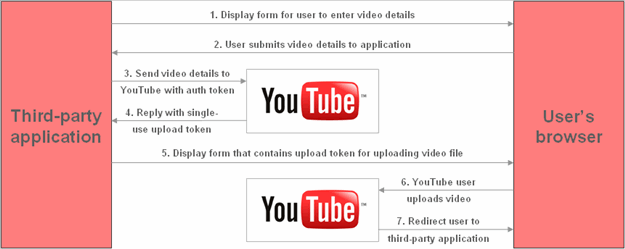
(https://developers.google.com/youtube/2.0/developers_guide_protocol_browser_based_uploading#Browser_Upload_Process)

1. Signup google account
2. Create your client_id then assign redirect_uri
3. Create your developer_key
4. Try my example code :)
  • authenticate & get access token
  • send video metadata(title,description,category,keywords,developertags) & get upload access token
  • now you can upload the video
Download

Important!
your upload will not show in feed immediately google has delay in searching your upload by using the api

[JS] Simple countdown

Adapt from here

source code
var t, interval=1000/250, fnCountdown=null;

function component(x,v){
    return Math.floor(x/v);
}
function countDown(){
    t=t-interval;
    var days = component(t, 24 * 60 * 60 * 1000),
        hours = component(t, 60 * 60 * 1000) % 24,
        minutes = component(t, 60 * 1000) % 60,
        seconds = component(t, 1000) % 60,
        milliseconds = t % 1000;
    if(t<=500){
        $('#countdown').html('Over!!');
        clearInterval(fnCountdown);
    }
    else{
        if(days<10) days = '0'+days;
        if(hours<10) hours = '0'+hours;
        if(minutes<10) minutes = '0'+minutes;
        if(seconds<10) seconds = '0'+seconds;
        milliseconds = (milliseconds+'').substr(0,3);
        //if(milliseconds<10) milliseconds= '00'+milliseconds;
        //else if(milliseconds<100) milliseconds= '0'+milliseconds;
        $('#countdown').html(days + ' : ' + hours + ' : ' + minutes + ' : ' + seconds + '.' + milliseconds);
    }
}

example (http://jsfiddle.net/X8MXr/)
​<div id="countdown">​</div>​
<script>
var start=new Date('2012/01/20 10:00:00'),
    end=new Date('2012/01/20 10:01:00');
t=end-start;

fnCountdown=setInterval(function(){countDown();}, interval);
</script>
​

Sunday, September 23, 2012

[JS] Easy way to detach browser

source code
// browser detection
$('html').removeClass('no-js');
$.each($.browser,function(a,b){
    if(a!='version'){
        if(a=='msie'){
            var v=Math.floor($.browser.version);
            $('html').addClass('ie ie'+v);
            for(var i=v;i<=10;i++)if(v<i)$('html').addClass('lt-ie'+i);
        }
        else $('html').addClass(a);
    }
});​

example (http://jsfiddle.net/NV5k6/)
<!-- before run js -->
<html class="no-js">
<head>....</head>
<body>....</body>
</html>​

<!-- after run js (running on ie8) -->
<html class="ie ie8 lt-ie9 lt-ie10">
<head>....</head>
<body>....</body>
</html>​